By Derek Martin | March 2025
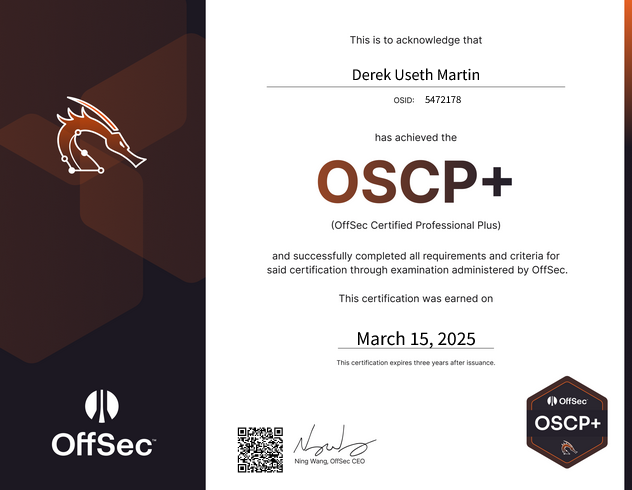
I recently passed the OSCP exam — root and Administrator on every target. But it took me five attempts to get there.
I want to lead with that because the OSCP community doesn't talk about failure enough. Five attempts. Each one got incrementally better — tighter enumeration, better time management, sharper instincts on when to pivot — but each failure still stung. Early on, I felt underprepared. Later, I had attempts where I felt technically ready but caught bad breaks — a rabbit hole that ate three critical hours, a machine that resisted every technique I threw at it. Going into the fifth attempt was a real test of wills. There were moments where I questioned whether the certification was worth the investment, whether I was fundamentally missing something.
What I learned through that process was resilience. Not the motivational-poster kind — the practical kind. The ability to sit down for another 24-hour exam after four failures, trust my methodology, and execute. That resilience didn't come from the course material. It came from failing, analyzing what went wrong, and coming back better.
I won't discuss specific exam content — OffSec takes that seriously, and so do I. But I can share the methodology, attack chain patterns, and preparation strategies that closed the gap between the PEN-200 course material and what the exam actually demands.
The Course Is a Foundation, Not a Ceiling
PEN-200 covers a solid curriculum:
- Enumeration: Nmap, SMB, SMTP, SNMP, DNS, vulnerability scanning
- Web attacks: Directory traversal, LFI/RFI, file upload, command injection, SQL injection, XSS
- Password attacks: Hash cracking, NTLM relay, brute forcing, password managers
- Privilege escalation: Service hijacking, DLL hijacking, cron abuse, SUID/sudo abuse, kernel exploits
- Active Directory: PowerView, BloodHound, Kerberoasting, AS-REP roasting, Pass-the-Hash, silver/golden tickets, DCSync
- Tunneling: SSH forwarding, Socat, Chisel, Plink
That's a strong foundation. But the exam doesn't test isolated techniques — it tests whether you can chain them together under pressure, often involving tools, services, and scenarios the course never mentions.
10 Gaps Between the Course and the Exam
1. Application-Specific Exploitation
The course teaches vulnerability classes. The exam throws specific applications you've never seen and expects you to research them in real time. You may face services on non-standard ports that you'll need to identify, research, and exploit within hours. The course covers ExploitDB and SearchSploit (Chapter 15), but the speed of going from "what is this software?" to "I have a working RCE" is only built through practice.
Prep: Work through Proving Grounds and HackTheBox machines with obscure applications. Practice the full workflow: identify version → search ExploitDB → read the exploit code → adapt for your target → execute. The key skill is reading and modifying exploit code, not memorizing CVEs.
2. Chained Web Application Attacks
PEN-200 teaches LFI and file upload as separate topics (Chapter 9). The exam may require combining them: upload a PHP shell via unrestricted upload, then trigger it through an LFI because the file isn't directly web-accessible. You may also encounter LFI filter bypasses (like ....//....// surviving a single-pass ../ strip) that go beyond course material.
Prep: Practice LFI beyond the basics — double-encoding, null bytes, path truncation, filter bypasses. When you find a file upload, always ask: how do I trigger execution?
3. Internal Service Discovery and Exploitation
Chapter 18 covers tunneling mechanics, but the exam demands a mindset: after any foothold, assume hidden internal services exist. The pattern is:
- Get a shell, run enumeration
- Discover a service on
127.0.0.1(web app, database, messaging platform) - Tunnel it back to your attack machine
- Exploit it for privilege escalation
Prep: On every practice box, run ss -tlnp or netstat -ano | findstr LISTENING after landing a shell. Investigate every internal service. Make SSH port forwarding second nature:
ssh -L localport:127.0.0.1:remoteport user@targetPractice forwarding multiple ports when a service has dependencies (like a web app and its database).
4. Platform-Agnostic Credential Recovery
Chapter 13 covers password attacks — hash cracking, brute forcing, password managers, SSH key passphrases — but it teaches them as isolated techniques against specific formats. The exam expects you to internalize the underlying principles and apply them to whatever credential storage mechanism you encounter, even ones the course never demonstrated.
You might find encrypted or encoded credentials in application databases, configuration backups, user profile directories, or proprietary file formats. The course won't have shown you every tool for every format. What matters is the methodology: recognize that you're looking at stored credentials, identify the encryption or encoding scheme, find the right tool or technique to recover plaintext, and then spray those recovered credentials everywhere.
Prep: Build comfort with the general workflow: find credential artifacts → identify the storage format → research decryption tools → recover plaintext → spray. Keep tools like hashcat, john, CyberChef, and format-specific decryption utilities in your toolkit. The specific tool matters less than the habit of always asking: "Can I recover plaintext from this?"
5. NoSQL Databases (MongoDB)
Chapter 10 covers SQL injection (MSSQL, MySQL) but MongoDB is absent. You may encounter a Mongo instance backing a web app where you need to enumerate it, dump credentials, or modify records (like escalating a user role to admin).
Prep: Learn the basics:
mongo                              # connect
show dbs                           # list databases
use <dbname>                       # select database
db.<collection>.find()             # dump records
db.<collection>.update(...)        # modify records
6. Web App RCE Through Admin Features
Chapter 8 covers XSS privilege escalation, but doesn't explore what you can do after becoming admin on a web platform. Many applications have legitimate admin features — webhook integrations, script consoles, plugin uploads, task runners — that can be weaponized for code execution.
Prep: For any web app you encounter, check HackTricks (book.hacktricks.wiki) for known RCE paths. The attack chain is: become admin (via credential stuffing, DB manipulation, or vuln exploitation) → abuse an admin feature for code execution on the underlying server.
7. MSSQL Post-Exploitation via sqlcmd
The course covers SQL injection against MSSQL but not what to do when you're already on a machine with MSSQL installed. sqlcmd comes pre-installed with SQL Server and lets you query databases locally — no need to tunnel traffic.
Prep: Learn the essentials:
sqlcmd -q "SELECT name FROM sys.databases;"
sqlcmd -q "SELECT * FROM <db>.information_schema.tables;"
sqlcmd -q "SELECT * FROM <db>.dbo.<table>;"
8. ACL-Based Active Directory Attacks
Chapters 21-23 introduce BloodHound and core AD attacks, but underemphasize the diversity of ACL-based paths. The exam may require chaining permissions like AllExtendedRights (reset a user's password) → log in as that user → leverage their privileges on another machine.
Prep: In practice labs, explore every BloodHound edge type and its abuse technique:
AllExtendedRights/ForceChangePassword— reset passwords viarpcclientGenericAll/GenericWrite— modify user attributes, set SPNs for KerberoastingWriteDacl/WriteOwner— grant yourself additional permissionsAddMember— add yourself to privileged groups
BloodHound's "Abuse Info" tab walks you through the exact commands for each.
9. Windows Credential Hiding Spots
Chapter 16 covers some credential locations, but the full variety you may encounter includes:
- Registry hives — stored credentials surfaced by WinPEAS
- PowerShell history —
ConsoleHost_history.txtoften contains plaintext passwords inNew-ADUserorInvoke-Commandcalls - Unattend.xml — Base64-encoded (not encrypted) setup credentials in
C:\Windows\Panther\orC:\Users\Public\ - MSSQL database tables — credentials stored by developers
- IIS config files and scheduled task definitions
Prep: Check all of these on every Windows machine, at every privilege level. Make it a checklist.
10. SeBackupPrivilege Abuse
The course briefly covers shadow copies (Chapter 23) but underemphasizes SeBackupPrivilege as a direct path to Administrator — especially on domain controllers where it yields domain admin credentials.
Prep: If whoami /priv shows SeBackupPrivilege:
reg save HKLM\SAM sam
reg save HKLM\SYSTEM system
Exfiltrate and run secretsdump.py -sam sam -system system LOCAL to extract NTLM hashes. On a DC, this gives you the domain Administrator hash for pass-the-hash.
My Setup: Windows Host with Kali WSL
A quick note on my environment, since this comes up often in OSCP forums. I ran a Windows host machine with Kali Linux installed through WSL (Windows Subsystem for Linux). This gave me the best of both worlds:
- Native Windows for RDP via
xfreerdp, GUI browsers for web application testing, CyberChef for quick encoding/decoding, and Notepad++ for reviewing large files - Full Kali terminal for all Linux-native offensive tools — nmap, netexec, evil-winrm, Impacket, BloodHound, and exploit scripts
- Multiple terminals simultaneously — during the exam I frequently had four or five terminals open: main shell, one or two SSH tunnels, enumeration tool output, and a terminal for quick commands and file transfers
Setup tips that saved me headaches:
- Test your WSL networking setup thoroughly during your PEN-200 lab work so you're confident in the configuration before exam day. Note that you won't be able to test the exam VPN in advance — the proctor will send you a diagnostic check script just before starting, so make sure your environment is solid beforehand.
- Verify networking is bridged correctly end-to-end; WSL networking quirks can cause issues with reverse shells if not configured properly
- Pre-arrange your terminal layout and browser windows so you're not fiddling with window management during the exam
- A second monitor is strongly recommended — I kept my browser and notes on one screen and terminals on the other
- Have your core tools pre-installed and tested. You may need to install something on exam day for a specific situation, but your standard toolkit shouldn't require setup under pressure.
The Exam Is 48 Hours, Not 24
Everyone talks about the 24-hour testing window. What they underemphasize is that this is really a 48-hour commitment: 24 hours hands-on, then 24 hours to write and submit a professional penetration testing report. The report is a pass/fail requirement — sloppy or incomplete documentation can fail you even with full compromise on every target. I've heard of people who rooted every machine and didn't pass because the report didn't meet OffSec's standards.
Screenshot Discipline
This is non-negotiable: once the exam VPN disconnects, you can never go back. There's no "let me just grab that one screenshot I forgot." I took screenshots obsessively throughout the exam and was grateful for every single one during report writing.
- Screenshot every
whoami,ifconfig/ipconfig, and proof flag the moment you get it - Screenshot key commands and their output at each stage of the attack chain
- Screenshot error messages and failed attempts too — they help reconstruct your narrative
- Annotate your notes in real time — at hour 20, you won't remember what you did at hour 3
Energy Management
You need to function for two days, not one:
- Don't burn out during the test. You need mental clarity to write a coherent report the next day.
- Take short breaks every few hours, eat actual meals, stay hydrated
- A 20-minute break that restores your focus is worth more than 20 minutes of bleary-eyed staring at a terminal
Report Prep
I cannot overstate how much your report template matters. I learned this the hard way — not on the OSCP, but on the HTB CPTS exam. I used Notion with a template I found online, and despite believing my technical content was correct, the report didn't pass. The presentation wasn't up to standard.
That experience taught me a critical lesson: use a trusted, purpose-built reporting tool with a proven template. Don't cobble something together from a random template you found on GitHub or export from a note-taking app. The difference in presentation quality can be the difference between passing and failing.
I highly recommend SysReptor. It's specifically designed for penetration testing reports, has OSCP-compatible templates ready to go, and produces professional output. Set it up before the exam with your template fully configured:
- Title page, table of contents, and methodology section pre-built
- Per-target sections for enumeration, initial access, privilege escalation, and post-exploitation ready to fill in
- Consistent formatting for code blocks, screenshots, and command output
On report day, you should be filling in content, not fighting with formatting. Stick with a trusted template and don't deviate.
The Methodology That Passes the Exam
Beyond the specific course gaps above, the exam is fundamentally a test of systematic methodology. Having a repeatable process matters more than knowing any single technique. Here's the approach that worked for me.
Phase 1: Comprehensive Enumeration
Enumeration isn't a phase you complete — it's a loop you run continuously.
- Full TCP port scan on every target — not top-1000, full. Services on high ports are not decorative; they're often the primary attack vector.
- Enumerate each service in depth: grab banners, identify exact versions, check for anonymous/default access, explore default web pages
- After any foothold, enumerate again from inside: internal ports, running processes, installed software, scheduled tasks, file system contents, user directories
- Run LinPEAS/WinPEAS on every machine you land on — even when you think you've already found the path. You might be wrong, and the tool catches things manual enumeration misses.
Phase 2: Credential Harvesting
Every machine is a credential opportunity. Build a master credential list and update it constantly:
- FTP anonymous access → backup files, browser profiles, config files
- Web applications → default credentials, exposed configuration files
- File systems → PowerShell history, registry entries, unattend.xml, database dumps, SSH keys
- Databases → credential tables in both SQL and NoSQL stores
Every credential gets sprayed against every user and service using netexec across SMB, WinRM, RDP, and SSH. Spray broadly, spray often. Password reuse across machines and users is common on the exam. A credential found on Machine A frequently unlocks Machine B, and a password found in a database might work for RDP or SSH on an entirely different host.
Phase 3: Chained Exploitation
Exam machines don't fall to single exploits — they fall to chains. Each individual step feels small: an anonymous FTP login, a decrypted browser password, an SSH tunnel to a localhost service, a database record modification, an admin-panel RCE. But strung together, those small steps yield root.
After every win, ask: "What does this give me access to that I didn't have before?" That question drives the entire exam.
Phase 4: Active Directory as a Graph Problem
The AD set demands graph-traversal thinking, not machine-by-machine exploitation:
- Get initial foothold on the entry-point machine
- Pivot to the internal network using your tunneling tool (Ligolo-ng, Chisel, or SSH)
- Run BloodHound immediately —
bloodhound-pythonworks remotely with domain creds - Mark your compromised user as "owned" and review outbound attack paths
- Follow the shortest path to Domain Admin, chaining credentials and ACL relationships across machines
- At each new machine, enumerate again — new credentials, new privileges, new paths
Learn your pivoting tool before exam day. Whether it's Ligolo-ng, Chisel, or SSH-based tunneling, you should be able to set it up in under 10 minutes. Debugging tunneling configuration under exam pressure is miserable and eats time you can't afford.
Core Toolkit
| Category | Tools |
|---|---|
| Enumeration | nmap, gobuster/feroxbuster, LinPEAS/WinPEAS |
| Exploitation | netexec, evil-winrm, searchsploit, ExploitDB scripts |
| Active Directory | bloodhound-python, rpcclient, secretsdump.py, Ligolo-ng or Chisel |
| Credentials | hashcat/john, CyberChef, format-specific decryption tools |
On Failure
Failing the OSCP is normal. Community estimates put first-attempt pass rates around 40-50%. It took me five attempts. I'm not embarrassed by that number — each attempt made me a better penetration tester than the one before.
Here's what those failures collectively taught me:
- The clock changes everything. In labs you can walk away and sleep on a problem. On the exam, every stuck hour tightens the pressure. Learning when to push through vs. switch targets is a skill that only comes from exam exposure. By attempt five, I had internalized a feel for when I was being productive vs. spinning my wheels.
- The proctored environment adds friction. Screen sharing, webcam, workspace checks — not hard, but unfamiliar. Do setup and ID verification well before your scheduled start time so it doesn't eat into your exam hours. By later attempts this was routine, but the first time it added real cognitive load.
- Stamina matters more than skill. At hour 18, methodical enumeration beats memorized techniques every time. Sleep well the night before. Have food and water at your desk. Take breaks even when it feels like you can't afford to — five minutes away from the screen can break tunnel vision that's been costing you an hour.
- Your methodology has to survive fatigue. The techniques you know at hour 2 are the same ones available at hour 20. What degrades is your ability to apply them systematically. Having a written methodology checklist — what to check, in what order, on every machine — keeps you on track when your brain wants to take shortcuts.
- Resilience is a skill, not a personality trait. After four failures, sitting down for a fifth attempt required something the course doesn't teach. I had to separate my self-worth from the exam outcome and focus purely on execution. That mental discipline was the hardest part of the entire OSCP journey, and arguably the most valuable thing I took from it.
If you fail — once, twice, or more — debrief yourself with the same rigor you'd apply to a pentest engagement: Was it enumeration? A missed service? A rabbit hole? Did you run out of time on the report? Did you forget critical screenshots? Each failure is data. Analyze it, fill the gaps, and go again.
Time Management
| Window | Focus |
|---|---|
| Hours 1-2 | Full port scans on all targets; begin enumeration on first interesting results |
| Hours 2-10 | Standalone machines; switch targets after 90 min if stuck |
| Hours 10-18 | AD set; BloodHound early, follow the attack path |
| Hours 18-22 | Return to unfinished standalones with fresh eyes |
| Hours 22-24 | Final screenshot verification — last chance before VPN closes forever |
| Hours 25-48 | Write the report from your notes and screenshots |
One thing that surprised me: coming back to a machine after working on others often unlocks it. Techniques you learn exploiting Machine B give you ideas for Machine A that you didn't have earlier. The exam rewards flexibility over stubbornness. Don't be afraid to walk away from a target and return later.
A Warning About Overconfidence
One thing I want to be candid about: I found OffSec's practice exam simulations (OSCP-A, OSCP-B, OSCP-C) to be nothing like the actual exam. To be clear, the PEN-200 course labs and challenge labs are valuable — do those. But the practice exams that are meant to simulate the real thing gave me a false sense of readiness that made exam day harder, not easier, because my expectations were miscalibrated.
This applies to external platforms too. It's easy to fall into the trap of thinking "I've rooted 100 boxes on HackTheBox, I'm ready." You're probably not. Practice boxes build technique. The exam tests technique plus time pressure, plus unfamiliar applications, plus multi-step chains, plus the mental toll of a proctored 24-hour session, plus a professional report afterward. No practice environment replicates all of those simultaneously.
Be careful about how much confidence you draw from your preparation. Use practice labs to build skills and methodology, but don't mistake comfort in a lab environment for readiness on exam day. The exam will humble you regardless — the question is whether your methodology is strong enough to carry you through when your confidence wavers.
Another thing to prepare for mentally: the variability in machine difficulty is extreme. Some machines fell in 15-20 minutes — the attack path was clear, the exploit worked cleanly, and I had proof in hand before I'd finished my coffee. Other machines took hours of enumeration, dead ends, and re-enumeration before the path revealed itself. Be ready for that whiplash. The rush of a quick compromise can create an expectation that the next machine will fall just as fast, and when it doesn't, frustration sets in hard. That frustration is where people spiral — spending three hours chasing a rabbit hole because they're convinced it should be easy. Recognize the variability, stay disciplined, and switch targets if the frustration is clouding your methodology.
Supplementary Resources
These resources filled the specific gaps that the PEN-200 course left:
- HackTricks (
book.hacktricks.wiki) — The single most useful exam-day reference. When you encounter an unfamiliar service, search HackTricks first. It covers application-specific exploitation, privilege escalation paths, and post-exploitation techniques for virtually every service you might encounter. - Proving Grounds Practice/Play — OffSec's own practice machines, and the closest to exam difficulty and style. Prioritize these over other platforms during your final preparation phase.
- HackTheBox — Focus on retired machines from community "OSCP-like" lists. Prioritize machines with multi-step attack chains over single-vulnerability CTF-style boxes. The exam is about chains, and your practice should reflect that.
- IppSec's YouTube — Watch for the methodology, not just solutions. Pay attention to how he approaches enumeration, how he pivots between attack vectors when something doesn't work, and how he keeps organized notes.
- TJ Null's OSCP-like list — A community-curated list of HackTheBox and Proving Grounds machines that mirror exam difficulty. This is the gold standard preparation list.
Final Thoughts
The PEN-200 course gives you the vocabulary of penetration testing. The exam tests whether you can speak the language fluently under pressure. The gap between those two things is filled by practice, diverse exposure, and a disciplined methodology that survives fatigue.
The exam will present something the course didn't explicitly teach — an unfamiliar application, a vulnerability chain you haven't practiced, a service you need to research on the spot. That's by design. OffSec's "Try Harder" philosophy means you're expected to research, adapt, and improvise under time pressure. The candidates who pass aren't the ones who memorized the course material — they're the ones who internalized the methodology deeply enough to apply it to problems they've never seen before.
And if you fail — once, twice, or five times — that's not the end of your story. Every attempt teaches you something the labs can't. Analyze it, fill the gaps, and go again. The certification doesn't record how many attempts it took. It just says you passed.